# Add a form to an existing React app
import { Stepper } from "zudoku/ui/Stepper"
In this guide, you add the [case intake form](/guides/case-intake-form) to a React application you
already have. When you finish:
- the form runs on a page of your application;
- each submission reaches your own API as a structured record;
- your server checks the record again before saving it; and
- a failed save shows a message and keeps what the user typed.
**Time:** about 20 minutes.
## Before you start
- **Node.js** `22` or newer
- **A React 18 or 19 application.** The steps use Vite. With another build tool, adapt the proxy
step.
- **`box-sizing: border-box` on all elements.** Most CSS resets set this, including the one in
Tailwind. Without it, form fields overflow their container.
To follow along with a new application, create one with Vite:
```bash
npm create vite@latest case-intake-demo -- --template react
cd case-intake-demo
npm install
```
Then replace the contents of `src/index.css` with this rule. It sets `box-sizing` and removes the
template's centered text:
```css
*,
*::before,
*::after {
box-sizing: border-box;
}
```
## Add the form
1. Install the form0 packages:
```bash
npm install form0-react form0-core
```
1. Download the schema from [Build a case intake form](/guides/case-intake-form). If you built that
form, copy your own `schema.json` to this path instead.
```bash
mkdir -p src/forms
curl -o src/forms/case-intake.form0.json https://docs.form0.dev/guides/assets/case-intake-form/case-intake.form0.json
```
1. Create `src/CaseIntakeForm.jsx`:
```jsx
import { FormRenderer } from "form0-react"
import "form0-react/index.css"
import schema from "./forms/case-intake.form0.json"
export function CaseIntakeForm() {
return (
console.log(record)}
/>
)
}
```
`recordKind` tells form0 whether this form creates a new record or opens a saved one, and
`FormRenderer` requires it. `formWidth` sets the maximum width of the form, which is `30vw` by
default.
1. Show the form on a page. In a new Vite application, replace the contents of `src/App.jsx`:
```jsx
import { CaseIntakeForm } from "./CaseIntakeForm"
export default function App() {
return
}
```
In your own application, render `` on the page where the form belongs.
1. Start the application and open the URL it prints, usually `http://localhost:5173`:
```bash
npm run dev
```
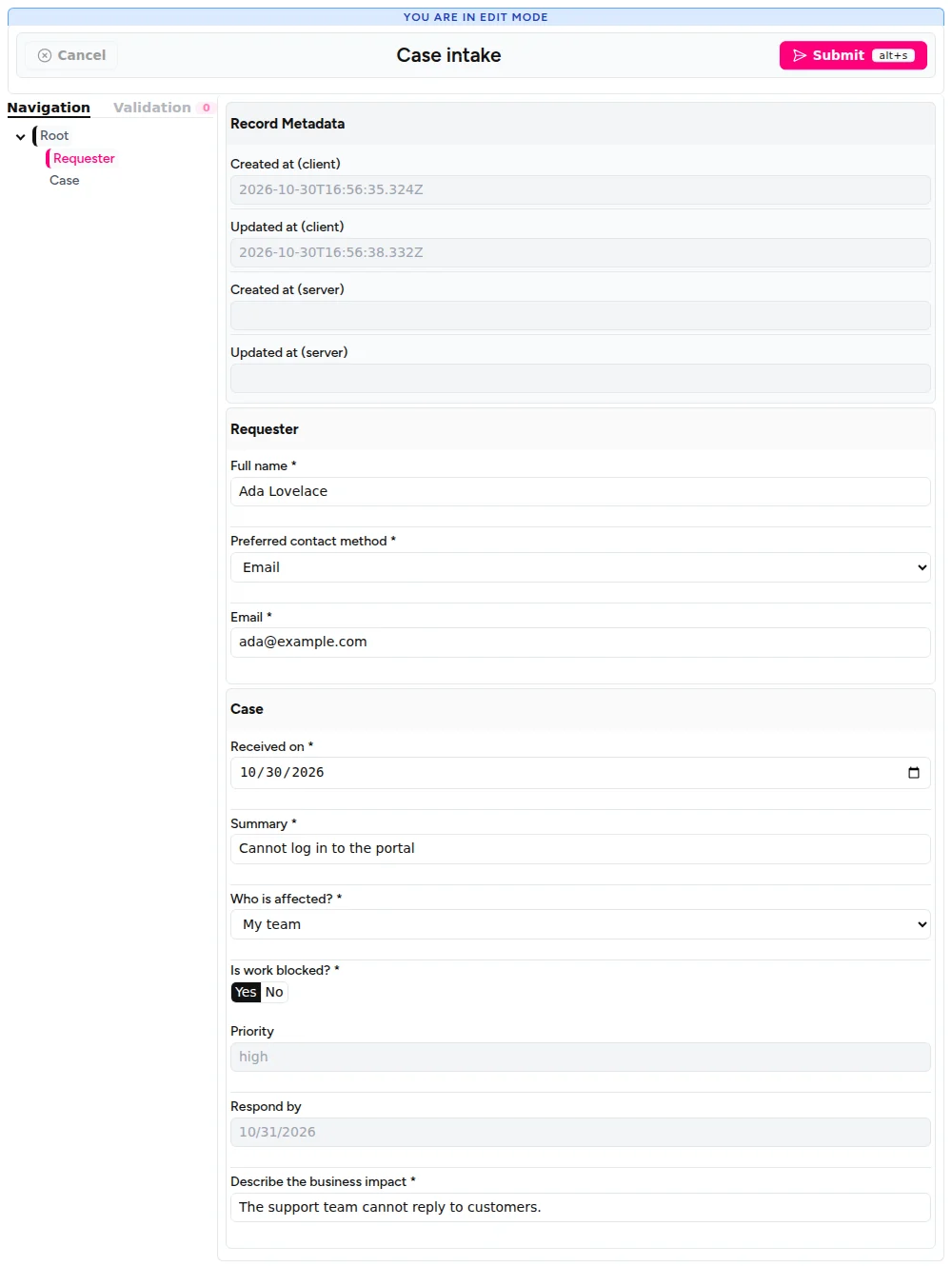
Fill in the required fields and click **Submit**. The browser console shows the structured
record.
`FormRenderer` shows its standard header, navigation panel, and record metadata. To change how the
form looks, see [Themes and styling](/bindings/react/themes-styling).
## Send records to your API
1. Replace `src/CaseIntakeForm.jsx` with this version, which sends each record to `/api/cases`:
```jsx
import { useState } from "react"
import { FormRenderer } from "form0-react"
import "form0-react/index.css"
import schema from "./forms/case-intake.form0.json"
export function CaseIntakeForm() {
const [formKey, setFormKey] = useState(0)
const [sending, setSending] = useState(false)
const [message, setMessage] = useState(null)
async function sendCase(record) {
setSending(true)
setMessage(null)
try {
const response = await fetch("/api/cases", {
method: "POST",
headers: { "Content-Type": "application/json" },
body: JSON.stringify(record),
})
if (!response.ok) throw new Error(`The server answered ${response.status}`)
setMessage("Case saved.")
setFormKey((key) => key + 1)
} catch (error) {
setMessage("The case was not saved. Try again.")
throw error
} finally {
setSending(false)
}
}
return (
{message && {message}
}
)
}
```
Three details matter here:
- `fetch` does not reject on a `500` response, so the code checks `response.ok` and throws.
- The `catch` block shows a message and then rethrows the error. Without the `throw`,
`FormRenderer` treats the save as successful.
- Changing `key` replaces the form with a new, empty one after a successful save.
1. Create `server/cases-api.mjs`. This example uses only Node.js and `form0-core`:
```js
import { readFileSync } from "node:fs"
import { createServer } from "node:http"
import {
buildFormRecordSnapshot,
createRecordEvaluator,
createStructuredRecord,
flattenFields,
} from "form0-core"
const schema = JSON.parse(readFileSync("src/forms/case-intake.form0.json", "utf8"))
const fields = flattenFields(schema.form.elements)
async function checkRecord(record) {
const { raw_values, repeatable } = buildFormRecordSnapshot(schema, record)
const result = await createRecordEvaluator({ schema }).prepareSubmission(
{
values: raw_values,
repeatable,
},
{ validateHiddenValues: true },
)
if (!result.eligible) {
return {
issues: result.validationSummary.orderedIssues.map(({ fieldName, message }) => ({
fieldName,
message,
})),
}
}
const checkedRecord = createStructuredRecord(result.snapshot, fields, {
originalElements: schema.form.elements,
})
return { checkedRecord }
}
function reply(response, status, body) {
response.writeHead(status, { "Content-Type": "application/json" })
response.end(JSON.stringify(body))
}
createServer(async (request, response) => {
if (request.method !== "POST" || request.url !== "/api/cases") {
return reply(response, 404, { error: "Not found" })
}
try {
let body = ""
for await (const chunk of request) body += chunk
const { checkedRecord, issues } = await checkRecord(JSON.parse(body))
if (issues) return reply(response, 422, { issues })
console.log("Saved case:", checkedRecord.form_values)
reply(response, 201, { saved: true })
} catch (error) {
console.error(error)
reply(response, 400, { error: "The record could not be read." })
}
}).listen(3001, () => console.log("Cases API listening on port 3001"))
```
The server reads the same schema file as the form, so both apply the same rules. It creates a new
evaluator for each request because a `prepareSubmission()` call cancels any earlier call still
running on the same evaluator.
1. Forward `/api` requests to that server during development. Replace `vite.config.js` with:
```js
import react from "@vitejs/plugin-react"
import { defineConfig } from "vite"
export default defineConfig({
plugins: [react()],
server: {
proxy: { "/api": "http://localhost:3001" },
},
})
```
1. Start the API in a second terminal, from the project root:
```bash
node server/cases-api.mjs
```
It prints `Cases API listening on port 3001`.
## Try it
Keep both terminals running, open the form, and follow these steps.
1. **Submit an empty form.** Click **Submit**. The required fields show their messages, and the API
terminal prints nothing.
1. **Save a case.** Fill in **Full name**, choose **Email** as the contact method, and fill in
**Email** and **Summary**. Choose **My team**, answer **Yes** to **Is work blocked?**, fill in
**Describe the business impact**, and click **Submit**. The page shows **Case saved.**, the form
empties, and the API terminal prints `Saved case:` with `priority: 'high'`.
1. **Make a save fail.** Stop the API with `Ctrl+C`, fill in the form again, and click **Submit**.
The page shows **The case was not saved. Try again.**, your values stay in the form, and the
browser console shows `[form0-react] Submit failed during onSubmit.`
1. **Retry.** Start the API again and click **Submit**. The case is saved.
1. **Send an incomplete record.** Call the API directly, without the form:
```bash
curl -i -X POST http://localhost:3001/api/cases \
-H "Content-Type: application/json" \
-d '{"form_values":{"name":"Ada"}}'
```
The server answers `422` and lists the missing fields.
1. **Send a wrong priority.** Save this record as `tampered-case.json`. Its answers give a `low`
priority, but it claims `high`:
```json
{
"form_values": {
"name": "Ada Lovelace",
"contact_method": {
"choice_value": [{ "value": "email", "label": "Email" }],
"other_value": []
},
"email": "ada@example.com",
"received_on": "2026-11-02",
"summary": "Cannot log in",
"impact": { "choice_value": [{ "value": "person", "label": "Only me" }], "other_value": [] },
"blocked": { "choice_value": [{ "value": "no", "label": "No" }], "other_value": [] },
"priority": "high"
}
}
```
Send it to the API:
```bash
curl -i -X POST http://localhost:3001/api/cases \
-H "Content-Type: application/json" \
-d @tampered-case.json
```
The server answers `201`, and the API terminal prints `priority: 'low'`. The server works out
calculated fields itself.
## How it works
### Validation runs twice
`FormRenderer` validates in the browser, so the user gets immediate feedback and `onSubmit` runs
only for a valid form. A client can skip that step, so `checkRecord()` repeats the check on the
server:
1. `buildFormRecordSnapshot()` turns the posted record back into form values and removes fields that
are not in the schema. It throws on a malformed record, and the server answers `400`.
2. `prepareSubmission()` runs the calculations again and applies the schema's rules. `eligible` says
whether the record passed.
3. `createStructuredRecord()` builds the record to save from the checked values, so it holds the
server's calculated results.
### What the server check covers
The server applies the rules in your schema and checks that each value has the right type:
| A client sends | Result |
| ------------------------------------------------------------------- | ------------------------------- |
| A required field left empty, including a conditionally required one | Rejected with `422` |
| A choice value that is not in the schema | Rejected with `422` |
| A changed calculated value | Replaced by the server's result |
| A field that is not in the schema | Removed |
| A choice field with the wrong structure | Rejected with `400` |
| A malformed date, such as `not-a-date` | Rejected with `422` |
| A number in a `TextField` | Rejected with `422` |
| A value of the wrong type in a hidden field | Rejected with `422` |
| A valid value in a hidden field | Saved with the record |
The server rejects a wrong type in a hidden field because `checkRecord()` passes
`validateHiddenValues: true`. A valid value stays because form0 keeps hidden values by default. To
clear a field when it is hidden, set `"visible_preserve_value": false` on it in the schema.
These checks only know your schema. Add your own checks before saving, such as whether this user may
create the case.
### Before production
This example stays short so the form0 calls are easy to see. Before you use it for real:
- Add authentication and a limit on the request size.
- Save `checkedRecord` to your database instead of printing it. [Connectors](/connectors/overview)
can store form0 records in PostgreSQL or SQLite.
- Keep the schema on your server. Never accept a schema from a client, because schemas contain code
that runs on your server.
## Where to go next
- [Values, snapshots, and submission](/bindings/react/values-snapshots-submission): restore saved
records and observe drafts.
- [FormRenderer](/bindings/react/form-renderer): all the properties of the component.
- [Output and records](/core/output-records): the structure of the record you receive.