
Add a form to an existing React app
In this guide, you add the case intake form to a React application you already have. When you finish:
- the form runs on a page of your application;
- each submission reaches your own API as a structured record;
- your server checks the record again before saving it; and
- a failed save shows a message and keeps what the user typed.
Time: about 20 minutes.
Before you start
- Node.js
22or newer - A React 18 or 19 application. The steps use Vite. With another build tool, adapt the proxy step.
box-sizing: border-boxon all elements. Most CSS resets set this, including the one in Tailwind. Without it, form fields overflow their container.
To follow along with a new application, create one with Vite:
Code
Then replace the contents of src/index.css with this rule. It sets box-sizing and removes the
template's centered text:
Code
Add the form
-
Install the form0 packages:
Code -
Download the schema from Build a case intake form. If you built that form, copy your own
schema.jsonto this path instead.Code -
Create
src/CaseIntakeForm.jsx:CoderecordKindtells form0 whether this form creates a new record or opens a saved one, andFormRendererrequires it.formWidthsets the maximum width of the form, which is30vwby default. -
Show the form on a page. In a new Vite application, replace the contents of
src/App.jsx:CodeIn your own application, render
<CaseIntakeForm />on the page where the form belongs. -
Start the application and open the URL it prints, usually
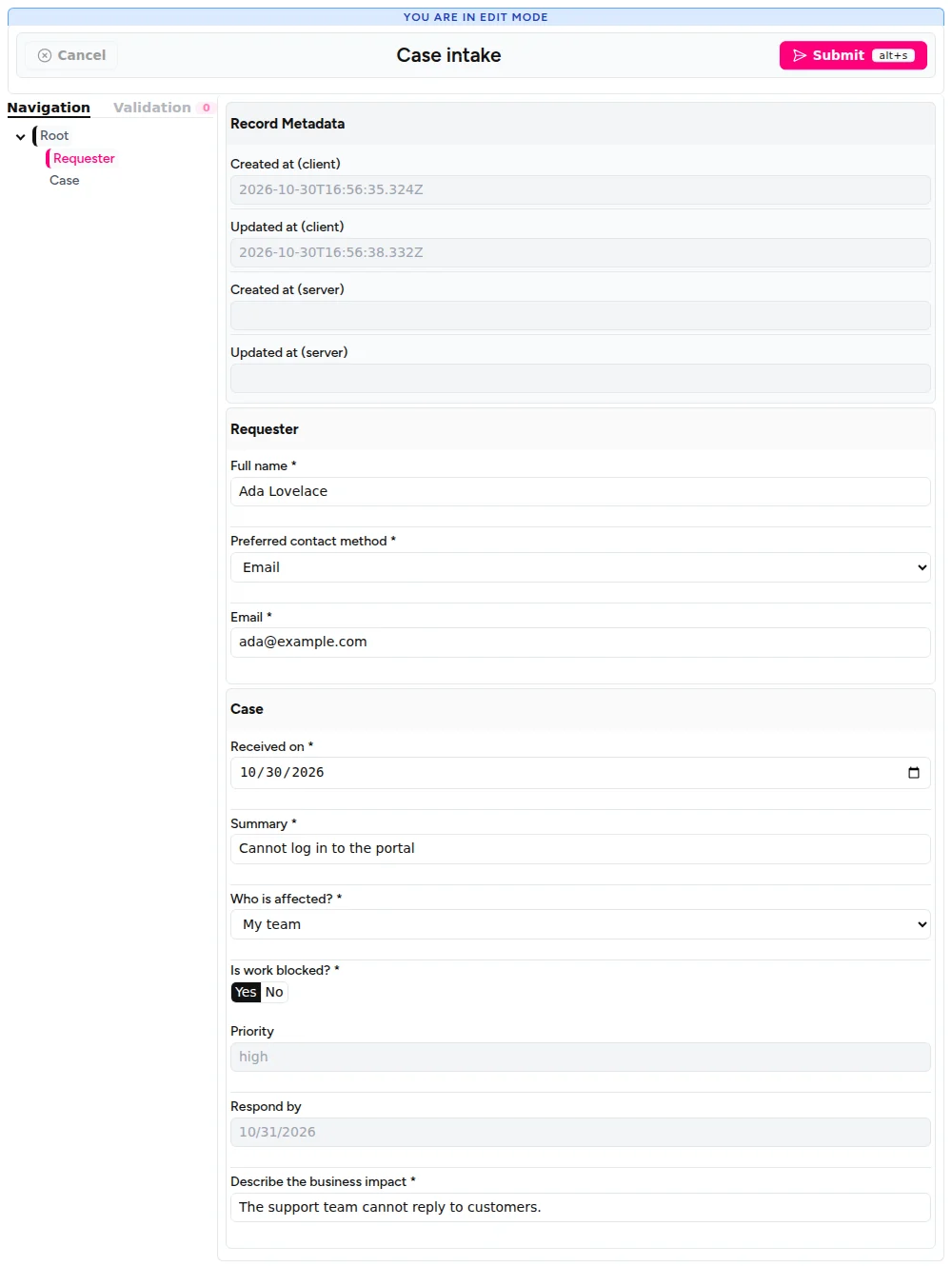
http://localhost:5173:CodeFill in the required fields and click Submit. The browser console shows the structured record.
FormRenderer shows its standard header, navigation panel, and record metadata. To change how the
form looks, see Themes and styling.
Send records to your API
-
Replace
src/CaseIntakeForm.jsxwith this version, which sends each record to/api/cases:CodeThree details matter here:
fetchdoes not reject on a500response, so the code checksresponse.okand throws.- The
catchblock shows a message and then rethrows the error. Without thethrow,FormRenderertreats the save as successful. - Changing
keyreplaces the form with a new, empty one after a successful save.
-
Create
server/cases-api.mjs. This example uses only Node.js andform0-core:CodeThe server reads the same schema file as the form, so both apply the same rules. It creates a new evaluator for each request because a
prepareSubmission()call cancels any earlier call still running on the same evaluator. -
Forward
/apirequests to that server during development. Replacevite.config.jswith:Code -
Start the API in a second terminal, from the project root:
CodeIt prints
Cases API listening on port 3001.
Try it
Keep both terminals running, open the form, and follow these steps.
-
Submit an empty form. Click Submit. The required fields show their messages, and the API terminal prints nothing.
-
Save a case. Fill in Full name, choose Email as the contact method, and fill in Email and Summary. Choose My team, answer Yes to Is work blocked?, fill in Describe the business impact, and click Submit. The page shows Case saved., the form empties, and the API terminal prints
Saved case:withpriority: 'high'. -
Make a save fail. Stop the API with
Ctrl+C, fill in the form again, and click Submit. The page shows The case was not saved. Try again., your values stay in the form, and the browser console shows[form0-react] Submit failed during onSubmit. -
Retry. Start the API again and click Submit. The case is saved.
-
Send an incomplete record. Call the API directly, without the form:
CodeThe server answers
422and lists the missing fields. -
Send a wrong priority. Save this record as
tampered-case.json. Its answers give alowpriority, but it claimshigh:CodeSend it to the API:
CodeThe server answers
201, and the API terminal printspriority: 'low'. The server works out calculated fields itself.
How it works
Validation runs twice
FormRenderer validates in the browser, so the user gets immediate feedback and onSubmit runs
only for a valid form. A client can skip that step, so checkRecord() repeats the check on the
server:
buildFormRecordSnapshot()turns the posted record back into form values and removes fields that are not in the schema. It throws on a malformed record, and the server answers400.prepareSubmission()runs the calculations again and applies the schema's rules.eligiblesays whether the record passed.createStructuredRecord()builds the record to save from the checked values, so it holds the server's calculated results.
What the server check covers
The server applies the rules in your schema and checks that each value has the right type:
| A client sends | Result |
|---|---|
| A required field left empty, including a conditionally required one | Rejected with 422 |
| A choice value that is not in the schema | Rejected with 422 |
| A changed calculated value | Replaced by the server's result |
| A field that is not in the schema | Removed |
| A choice field with the wrong structure | Rejected with 400 |
A malformed date, such as not-a-date | Rejected with 422 |
A number in a TextField | Rejected with 422 |
| A value of the wrong type in a hidden field | Rejected with 422 |
| A valid value in a hidden field | Saved with the record |
The server rejects a wrong type in a hidden field because checkRecord() passes
validateHiddenValues: true. A valid value stays because form0 keeps hidden values by default. To
clear a field when it is hidden, set "visible_preserve_value": false on it in the schema.
These checks only know your schema. Add your own checks before saving, such as whether this user may create the case.
Before production
This example stays short so the form0 calls are easy to see. Before you use it for real:
- Add authentication and a limit on the request size.
- Save
checkedRecordto your database instead of printing it. Connectors can store form0 records in PostgreSQL or SQLite. - Keep the schema on your server. Never accept a schema from a client, because schemas contain code that runs on your server.
Where to go next
- Values, snapshots, and submission: restore saved records and observe drafts.
- FormRenderer: all the properties of the component.
- Output and records: the structure of the record you receive.